

*For small US marketing teams, the CapCut-vs-Canva choice is not about feature count: Canva wins when the team needs governed templates and brand consistency, while CapCut Design Studio wins when the team is still hunting for the campaign’s visual direction on a blank page.*
For small US marketing teams, the CapCut vs Canva choice is not really about which tool has more AI features. Canva is the safer default when the team already has approved layouts, brand rules, and repeatable social formats. CapCut Design Studio is the stronger AI design choice when the team is still trying to find the campaign’s visual direction.
That is the decision most comparison charts blur. Templates are useful until they make every launch graphic and promo banner feel interchangeable. The harder question is not “Which tool is easier?” but whether the team needs governed production or visual exploration. Canva is a template-led, brand-production platform for governed layouts and repeatable assets; CapCut Design Studio is an AI canvas workspace for exploring directions, generating campaign assets, and iterating image-level edits.
The real split is workflow, not feature count
Both tools speak to creators and small teams, both include AI-assisted creation, and both help non-designers move faster — but they start from different assumptions. Ramp’s comparison describes Canva as an accessible, template-driven platform with a vast library, drag-and-drop editing, collaboration, brand-consistency automation, and broad integrations. CapCut introduced Design Studio 2.0 (official Facebook) as a reimagined CapCut Web experience that is “more intuitive, visual, and exploratory,” and its official AI Design Studio page positions it for images, posters, and ads with AI-driven layouts and automated scene workflows. The distinction: Canva helps a team finish the asset it already has in mind; CapCut Design Studio helps a team discover the asset it has not yet pictured.
Comparison matrix
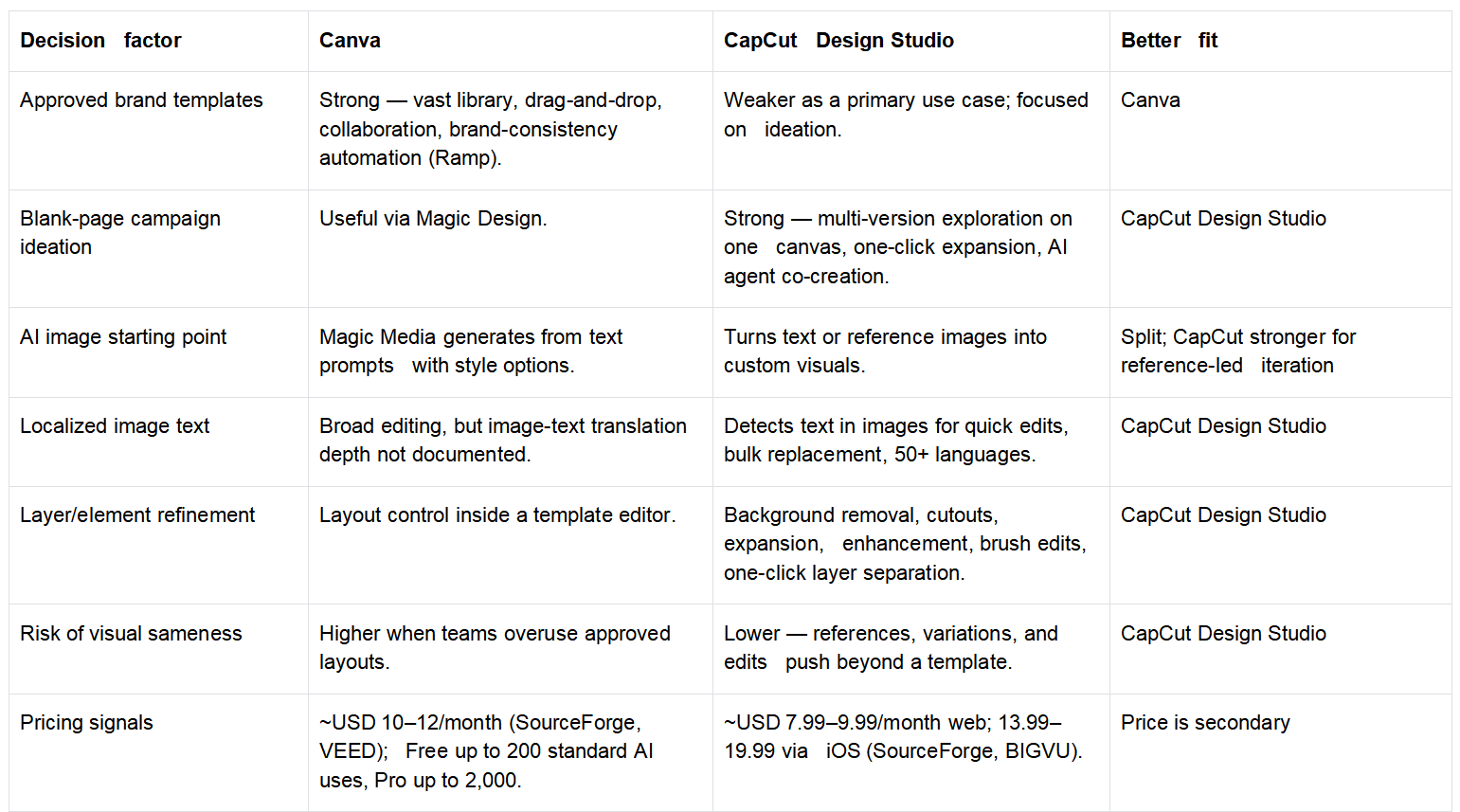
Competitor data here is based on the supplied public sources (Ramp, VEED, Canva, SourceForge, BIGVU, CapCut official pages).
Where Canva wins: governed template production
Canva is the better answer when the team already knows the format — a weekly carousel, a sale banner, a webinar promo, a pitch slide. There the creative problem is consistency, not discovery, and Ramp’s comparison highlights Canva’s template-driven model, brand-consistency automation, collaboration, and integrations. For a small brand team that saves real friction: the social manager doesn’t reinvent a layout, the contractor doesn’t ask where the logo goes, everyone works in a familiar lane. The limitation sits inside that strength — if the campaign needs a new look, templates become a ceiling, pulling the next asset back toward what already exists. That is exactly where the comparison turns.
Where CapCut Design Studio wins: blank-page exploration
CapCut Design Studio is more interesting when the team doesn’t yet know what the campaign should look like. Its workflow is built around a canvas rather than a template slot: CapCut materials describe multi-version exploration on one canvas, AI embedded into the canvas, drawing and selection tools for visual instructions, inspiration collection via a browser plugin, and an AI agent that can discuss directions, retrieve inspiration, and create in bulk. Its official LinkedIn post calls it “built on an infinite AI canvas” where references, drafts, iterations, and assets sit in one workspace; its Facebook post invites users to “explore endless ideas in one space,” edit with brushes, refine layers, and co-create with an AI agent. That fits an early campaign stage — mood exploration, product-scene ideas, rough ad directions, alternate hero images, localized variants compared side by side. CapCut’s own line (“Stop Templating, Start Designing”) is marketing language, but the product argument behind it is concrete: the canvas gives teams room to find direction before locking execution.
AI image generation: prompt-to-asset vs iteration workspace
Both tools can generate an image; the deciding factor is what happens after the first output. Canva Magic Media creates images from text prompts with style options (realistic, cartoon, abstract) — a clean path for a user who can describe the visual and wants it inside a Canva workflow. CapCut’s AI image generator turns text or reference images into custom visuals, and the reference-image path matters because many teams don’t start with a perfect prompt — they start with a product photo, a creator image, or a half-formed stakeholder direction. CapCut’s advantage is the iteration loop: one-click expansion, quick duplicate and regenerate, multi-version comparison, brush instructions, and layer separation, which makes it a working board rather than a single prompt box. Canva is strong when the prompt is part of production; CapCut Design Studio is stronger when the prompt is only the first move.
Editing and localization: the mid-campaign test
Most comparisons overvalue generation and undervalue revision, but real campaigns break in revision — the product name changes, the legal line must be added, the background is wrong for one channel, the visual needs a Spanish version. CapCut materials list background removal, cutouts, image expansion, high-resolution enhancement, localized brush edits, precision selection, one-click layer separation into background/subject/elements/typography, plus text recognition for bulk edits and translation across 50+ languages; its AI Design Studio page adds product-scene generation and one-click product replacement in the same background for ecommerce. That is a strong fit for small teams producing variations from one idea, because the tool keeps the image editable after the first AI pass. Canva stays safer when changes are mostly layout and brand-system changes; CapCut Design Studio looks better when changes happen inside the image itself.
Brand consistency and collaboration still favor Canva
CapCut’s exploration advantage doesn’t erase Canva’s core value. For many US teams the real pain isn’t a lack of ideas — it’s too many people making off-brand assets. Ramp’s comparison says Canva excels in brand-consistency automation, integrations, and collaboration; Canva even positions its Video Maker as a “free CapCut alternative.” In that use case Canva is a governance layer for people who shouldn’t reinvent the brand every Tuesday. The hidden cost is creative narrowing: once everything is built from approved templates, the team moves faster while noticing less. That is the tradeoff.
Pricing: don’t decide on price alone
The references point in different directions — VEED lists Canva Pro from USD 12/month; SourceForge lists Canva at USD 10 and CapCut at USD 7.99; BIGVU puts CapCut Standard near USD 9.99/month, with Pro 13.99–19.99 via iOS and 7.99–9.99 via web; Canva’s page caps Free at 200 standard AI uses and Pro at 2,000. The gap is too unstable to carry the decision. Workflow fit is the sturdier variable.
Buyer-fit recommendations
- Fixed brand guidelines, recurring formats, approval-heavy production → Canva. Hidden cost: work can become visually predictable.
- Launching a new campaign, look not yet found → CapCut Design Studio. Hidden cost: a canvas of variations still needs someone to choose.
- AI images from simple prompts inside a design system → Canva.
- Reference-image generation, product-scene variations, element edits, localized image text → CapCut Design Studio.
- Broad collaboration and consistency across many non-designers → Canva.
One market signal, not decisive on its own: Ramp’s June 2026 data ranks CapCut No. 5 in Content Creation, used by 5% of organizations with a vendor there (up 4 points), highest among enterprises at 9%. CapCut is no longer just a consumer reference point, but Canva still has the clearer design-governance story. The rule holds: filling approved layouts → Canva; discovering the campaign’s visual direction → CapCut Design Studio.
FAQ
CapCut vs Canva for AI design — which is better?
Canva is better for governed template production; CapCut Design Studio is stronger for blank-page campaign exploration. Canva fits teams with approved layouts and brand rules; CapCut fits teams still finding the look.
CapCut or Canva for AI image generation?
CapCut Design Studio is stronger when generation needs reference-led iteration; Canva is strong for text-prompt images inside a template workflow. Magic Media creates images from text prompts, while CapCut works from text or reference images with a full iteration loop.
Which is the best AI design tool, CapCut or Canva?
It depends on the workflow: Canva for approved brand templates and collaboration, CapCut Design Studio for campaign ideation, reference-image variations, and localized image edits.
*About this comparison: decision factors — brand templates, blank-page ideation, AI image starting point, localized image text, layer refinement, visual-sameness risk, and pricing — are scored using the supplied public sources (Ramp, VEED, Canva, SourceForge, BIGVU, and CapCut’s official pages). Pricing is unstable across sources and treated as a signal, not the deciding factor*
Contacts
Ming Hu
[email protected]
capcut.com
China